Xiaomi 60-inch 4K Mi TV 3 Smart TV


New Xiaomi 60-inch 4K Mi TV 3 Smart TV


Xiaomi has announced the new 60-inch 4K Mi TV 3 smart TV in China. It’s a larger (60-inch) version of Xiaomi’s smart TV with a LG 4K display. Mi TV 3 is comprised of 2 separated parts: the display itself and the speaker box, which does all the work, unlike other smart Tvs that come with built-in speakers in the device’s chassis, the processors and the circuit card for the MiTv are located in the speakers. The TV connects to the speaker box via a single cable, and all your other sources connect to the speaker box instead of the TV They can be upgraded respectively.

The speaker box unit all the ports above. The main logic board is inside the speaker box as well, along with two 2.5-inch woofers and single dome tweeter on either side for each channel. The box also has three HDMI inputs (no confirmation if they're 1.4 or 2.0), USB 3.0 + USB 2.0 ports, VGA input, Ethernet, AV in, RF in, and sub-woofer out. The system runs on Android 5.1 but uses Xiaomi's custom UI instead of Android TV.


Now Let's learn more features and specifications of this new Xiaomi 60-inch 4K Mi TV 3 smart TV

Highlights :
Xiaomi has just unveiled the third-generation Mi TV.
60-inch display, and is extremely thin, it is only 11.6mm thick (at its thinnest point), while it’s 36.7mm thick at the thickest point.
This smart TV sports an aluminum frame, and a metal backplate.
The Mi TV 3 actually sports True LG’s 4K panel.
This display has a color gamut of NTSC 85% and MEMC motion compression, and it will offer super clear motion images according to Xiaomi.
Connectivity options include HDMI (x3), USB (x2), VGA, Ethernet, AV in and RF modulator
As far as sound goes, Mi TV 3 actually packs in four 2.5-inch mid-range subwoofers, and it will offer clean sound and really deep bass.

• Screen :
- Original screen - LG screen
- Resolution - 3840 * 2160 true 4K
- 3D - not supported
- Backlight - Mi / Radiant jointly developed Bottom side LED
- Intelligent backlight - 8 partitions smart regulation
- Dynamic backlight - support
- High color saturation - > 85%
- Motion compensation - 6M60 professional image processing chip + MEMC motion pictures provide compensation
- Viewing angle - 178 °
- Static contrast ratio - 1200: 1
- Dynamic response - 8 ms
- Refresh rate - 60Hz
- Process - Double 45 ° diamond cutting technology Borders
- Metal America back

• Mi TV Bar :
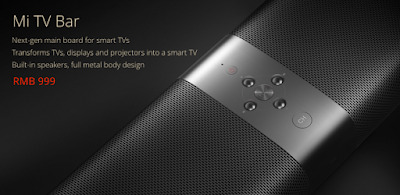


CPU - Mstar 6A928,Quad-core 1.4GHz Cortex-A17
GPU - Mali-760 MP4, 4 + 4-core
RAM - 2GB,Three-channel DDR3
Flash - 8GB,eMMC 5.0

• Wireless Configuration :
- WIFI - Dual-band 2.4 / 5GHz, 802.11a / b / g / n / ac, support Beamforming
- WiFi Antenna - 2x2 dual antenna, double signal
- Bluetooth - Bluetooth 4.1 / BLE low power consumption
- Bluetooth - Independent Bluetooth antenna , you can connect multiple devices simultaneously
- Bluetooth antenna - mouse , keyboard, headphones , audio, and other wireless devices

• Mi Tv 3 Ports :


- HDMI - HDMI 2.0 x 3
- VGA  - 1
- AV - 1
- Analog signals DTMB - 1
- USB - USB 2.0 x 1,USB 3.0 x 1
- SD slot - No
- Ethernet -1
- Audio Output -1, Support 2.5mm Line Out connection sub-woofer

• Audio and video playback performance :
- Internal media Player - Built Mi-Player all format player, Support RM, FLV, MOV, AVI, MKV, TS, MP4 , and all mainstream formats
- H.265 / H.264 Hardware decoding - H.265 4K @ 60frame,H.264 4K @ 30frame
- Other decoding - H.263 1080P @ 30frame, MPEG1 / 2/4 1080P @ 30frame,VP8 1080P @ 30frame, REAL7 / 8/9 1080P @ 30frame, MJPEG 1080P @ 30frame
- Audio decoding - DOLBY, DTS double decoding audio Dolby sound
- After treatment - The latest Dolby sound technology, Virtual Surround, Bass Boost,To Bai Zengqiang, Automatic volume adjustment.


If you have any questions, Please feel free to leave a comment below and we’ll try to help you out. If you found this article useful, why not share it with your friends and help inform others.


Search Terms : How, How to, How do, Xiaomi Mi TV 3, Xiaomi, Mi TV, TV, Smart TV, Display, Speaker, HDMI, Screen, Ports, USB port, WIFI, Bluetooth, Android, Channel, subwoofer, Ethernet, upgrade, woofer,


Category: Tech"News"
New Products

Xiaomi 60-inch 4K Mi TV 3 Smart TV - Video


This video will show review of Xiaomi 60-inch 4k mi tv 3 smart TV and How it work?
Also see Related Articles below links:


For more information click on the links below

 Xiaomi 60-inch 4K Mi TV 3 Smart TV
If you're having trouble playing videos, we suggest you to install the latest version of the Adobe Flash player.

If you're seeing the "You need to upgrade your Adobe Flash Player to watch this video / Missing Plug-in" error,

First you can upgrade the latest version of “Adobe Flash Player” after that view/play video’s.

Get the latest Adobe Flash Player (Download Adobe Flash Player)


Search Terms : How, How to, How do, Video, Videos, Xiaomi Mi TV 3, Xiaomi, Mi TV, TV, Smart TV, Display, Speaker, HDMI, Screen, Ports, USB port, WIFI, Bluetooth, Android, Channel, subwoofer, Ethernet, upgrade, woofer, 

The A to Z About RSS - Download e-book


Free Download A to Z About R.S.S Feeds


The A to Z About RSS Feeds
What is RSS and how it can make you money:

Do you need to add more profitable and useful technology to your website. Use RSS (Really Simple Syndication)  feeds to organize your website content and push information to subscribers. Do you want to broadcast your articles to your reader easily? Learn how to use RSS feeds the right way with our A to Z About RSS Feeds and install it properly buy buying the ebook (A to Z About RSS Feeds). A to Z About RSS Feeds tells you everything about it step by step. RSS feed like other social media tools can help you reach a lot of people from your website. For example news media use RSS feed to announce their daily changing content as a result of all the constant news coming in. Learn how they do it with A to Z About RSS Feeds. It helps them keep up with updating their subscribers.  

We have a wonderful ebook called A to Z About RSS Feeds that takes time to break down and analyze everything about RSS feed. Installing RSS feed to any website can be very beneficial and will increase your website popularity and ranking if you don't already know. RSS feed is pretty simple to get started with if you download and use this eBook A to Z About RSS Feeds to learn all about it. RSS feeds can also be use to broadcast your blog or broadcast your article. Social media like twitter are also good for broadcasting website and blogs. 

We are about to help you explore the various faces of RSS in the fields of marketing and publishing and help you discover the possibilities of expanding your various business opportunities like never before through this incomparable e-book on RSS, “The A To Z About RSS..

•  Use RSS to reach new heights and discover the undiscovered depths in your business or marketing field.

•  Get all of your online content and messages delivered to your customers as fresh, unharmed, and unblocked by spam filters as you have desired to for so long..

•  Give a remarkable face-lift to your web site by taking advantage of the salient features of RSS.

•  Gear up your search engine rankings and drive more traffic to your web site.

•  Don't worry about having lost past customers, to email deliver ability issues... Chances are that you will win not only them back but also thousands of fresh new prospects with this remarkable tool.

•  What's more? Seize this golden opportunity to get your content published on other web sites increasing the number of visitors and widening the exposure of your business 10 fold!

•  Use RSS to build strong customer relationships and enjoy the resulting benefits reflected in your business.

•  Ultimately use RSS to increase your sales in ways you never thought possible before on the internet!


RSS, the simple, easy to use publishing tool for marketers and publishers allows easy and effective delivery of your online content to your subscribers and other web media.

Discover the power of this amazing tool via this e-book which throws light on the salient features no more or no less but accurately, enabling you to finally know the truth about this flourishing online path!!

• Get familiar with the various RSS terminologies. After all, the better you are aware with the terminologies that will soon be ruling the Internet the more proficient you will get with these tools..

• Learn about RSS as a marketing tool. Squeeze out the advantages of the RSS to earn more and more on the Internet Than ever before. Unravel the unknown facts about ‘blogging' and how RSS supports blogging in a versatile way.

How to build it and how to drive traffic to it, how to read RSS feeds, we tell you everything A to Z – its just a smooth swim across a quiet river! No ambiguity! No confusions!

The illustrated examples prove a clear glass perspective you need to understand the procedures in and out thoroughly!

By the time you finish with The A To Z About RSS- you will know everything you need to know to start building the traffic to your web site and blog like never before..

Its so easy and so simple that you will find it difficult not to understand no matter what your computer learning level.

• Big media like ABC, CNN, Washington post, New york times and BBC have already gone the RSS way for publishing their content. And most of the leading publishers and newspapers are either using RSS or planning to use it.

• The Christian Science Monitor has implanted RSS feed in their web site since October 2002 and offers over 25 different RSS feeds

• A Nooked influencer survey states that 87% of their respondents use RSS feeds.

• Microsoft Chairman Bill Gates conveyed to the 2004 CEO Summit attendees that RSS “...get[s] away from the drawbacks of e-mail – that it's too imposing – and yet the drawbacks of the Web site – that you don't know if there's something new and interesting there -- this is about solving that.” 

> You will need Adobe Acrobat Reader Software to read a PDF e-book (Download Adobe Acrobat Reader)
    Click the followings links below to Download this ebook 
    Photobucket

    Download Now


    If you have any questions, Please feel free to leave a comment below and we’ll try to help you out. If you found this article useful, why not share it with your friends and help inform others.


    Search Terms : How, How to, How do, ebook, ebooks, e-book, e-books, free, free download, Download free, RSS products, The RSS Course, how to set up your RSS Feed,  make money with RSS Fedd,  RSS Videos, RSS tutorial, Earn money with RSS Feed, pdf download, pdf document, download pdf, download free pdf, PDF ebook, pdf books, 


    Category: Download
    e-book

    Blogging: The Best Online Marketing method for Small business - Video


    This video will show you what is Blogging and Internet Marketing and How it work?
    Also see Related Articles below links:

    For more information click on the links below

    If you're having trouble playing videos, we suggest you to install the latest version of the Adobe Flash player.

    If you're seeing the "You need to upgrade your Adobe Flash Player to watch this video / Missing Plug-in" error,

    First you can upgrade the latest version of “Adobe Flash Player” after that view/play video’s.

    Get the latest Adobe Flash Player (Download Adobe Flash Player)


    Search Terms : How, How to, How do, Video, Videos, Advertisement, Advertising, Affiliate, Article, blog, blogging, Business, e-mail, Email, Internet, market, Marketing, Miscellaneous, Network, Online, product, reader, visitor,  http://easyway2pcs.blogspot.com/2015/01/why-blogging-is-best-online-marketing-method-for-Small-business.html

    Noob Killer - Useful Virus Removal Tool


    Download Free Noob Killer
    Noob Killer by Leerz  is a simple tool to designed easily remove common worms and viruses, it has many useful tools that would help users and administrators get back control and clean their personal computers. I personally use this removal tool on my computer to repair/remove most viruses and worms. Easy to use, fast and lightweight.

    You will need the VB6 Runtime Environment as this program was written using Visual Basic program, if not you will receive this error when trying to open the program:

    Error :
    NOOB.KILLER.leerz.exe - Unable to Locate Component
    This application has failed to start because MSVBVM60.DLL was not found. Re-installing the application may fix this problem.


    Noob Killer by Leerz most recent version is able to pick up and remove the following annoying viruses:

    * VBS Worm\Solow
    * Baguio Strawberry Worm
    * Yahoo! Worm (Sohanad) || Some Variants
    * Krag.exe (I´m Not The Only One)
    * Destrukto | explorar.vbs
    * jay.exe | jaymykawen9
    * w32dranyam | marcmaynard.exe
    * Funny UST Scandal(Avi).exe
    * SilentSoftech.exe | anti-taga lipa are
    * Disk Knight
    * Thank You!! Password WinZip123 | password_viewer.exe bar311.exe
    * iloveher.exe | say no to drugs!!!
    * display monitor.exe | new folder variant
    * ImgKulot and variants, jamesgo, bungoton and the like [*.bat, *.reg, *.vbs collection]
    * kxvx | kavo, amvo, kevo
    * transmit.exe setup.exe | black pegasus
    * .. and still counting!


    List of registry hotfixes that restores settings on the registry that has been modified by viruses causing severe errors and usability impairment.

    * Folder Options
    * Task Manager
    * Regedit
    * Control panel
    * Task Bar Right Click
    * IE Title Bar Caption
    * Show all hidden files
    * and Turning on\off of autorun on CD Drives, and Flashdrives respectively.

    The latest build currently has the following tools:
    * Run replacement similar to MS Windows run
    * Run Items shows run items on startup with delete and backup functions.
    * Simple Process Explorer, able to close down Processes hidden on the standard Task manager.
    * Delete File on Restart  similar to Unlocker, Hijackthis, MoveOnBoot programs.
    * Create Copies of Windows Native TroubleShooting Tools such as
    * Msconfig, CMD, regedit, taskmanager


    The Handy Live update feature allows users to update their Noob Killer with just a few mouse clicks within the Program itself.

    Currently, the production is trying to make the Noob Killer Compatible with new and old systems, keeping the Program, small, portable and non bloated for efficiency and importantly Speed.

    The Noob Killer is under testing on Windows Vista, working for support to get things running properly, it has been tested under WINE on Linux and is able to run smoothly without too much quirks.

    How to use Noob Killer by Leerz:
    1. There are several files at the noob killer folder. You need to run NOOB.KILLER.leerz.exe
    2. Update the program if you are not sure that you are using the latest one. Select X at the toolbar and select Live Update Now!
    3. After updating, click 8-X Kill All and it will scan for all possible virus infection it can get rid off. Remember that it will restart your computer after that so you need to save all your work prior to running Noob Killer by Leerz.

    Remove these Virus Manually :

    Removing Taga Lipa Are & Hacked By Godzilla Manually by Leerz: 

    [*] Quick Steps [ OverView ]
    -> Plug all infected medias
    -> Close all Wscript.exe instances from the Task manager
    -> Set Files and Folders Settings to
    > "Show Hidden Files and Folders"
    > (uncheck/untick) "Hide File Extensions for Known File Types"
    -> Delete 
    >"FS6519.dll.vbs" or 
    >"MS32DLL.dll.vbs" or 
    >"maskrider2001.vbs" 
    > "XXXXWORMNAMEDLL.VBS" 
    ^ Common mask name Format
    >"autorun.inf"
    > from [each] drive root and "root\Windows\" folders
    -> Delete
    > "HKEY_LOCAL_MACHINE\Software\Microsoft\Windows\CurrentVersion\Run\FS6519"
    > "HKEY_LOCAL_MACHINE\Software\Microsoft\Windows\CurrentVersion\Run\ms32dll"
    > "HKEY_LOCAL_MACHINE\Software\Microsoft\Windows\CurrentVersion\Run\maskrider"
    > "HKEY_LOCAL_MACHINE\Software\Microsoft\Windows\CurrentVersion\Run\XXXXWORMNAME" 
    ^ Taken From XXXXWORMNAMEDLL.VBS / It's Common Mask name Format
    > from the Registry
    -> Delete or change to blank\nothing
    > "HKEY_CURRENT_USER\Software\Microsoft\Internet Explorer\Main\Window Title"
    > from the Registry
    -> Restart and Done!


    [*] Steps [ Details ]
    -> Plug "ALL" infected medias such as your :
    - USB/Flashdrive/disk
    - mp3, mp4, Cellphones
    - anything that is recognized as 'Removable Media'
    - Mass Storage Devices and 
    - anything that can be accessed and Written localy

    -> Open Task Manager 'ctrl + alt + del' 
    - Make sure you're in the Process list[WinNT Processes]

    -> End & close all instances of "Wscript.exe" from the Process list

    -> Open Folder Options, click on the 'Views' tab
    > Enable 'Show hidden files and folders' and
    > Uncheck ' Hide protected operating system files'
    -Control Panel >> Folder Options or
    -Windows Explorer >> Tools >> Folder options

    -> Delete "FS6519.dll.vbs" or "MS32DLL.dll.vbs" or "maskrider2001.vbs" and autorun.inf
    > from [each] drive root and "root\Windows\" folders
    > check all Drives, C:\, D:\, E:\

    -> Delete the "FS6519" with the value "C:\WINDOWS\FS6519.dll.vbs" from
    > "HKLM\software\Microsoft\Windows\CurrentVersion\Run\" 

    OR

    -> Delete the "ms32dll" with the value "C:\WINDOWS\ms32dll.dll.vbs" from
    > "HKLM\software\Microsoft\Windows\CurrentVersion\Run\" 

    OR

    -> Delete the "maskrider" with the value "C:\WINDOWS\maskrider2001.vbs" from
    > "HKLM\software\Microsoft\Windows\CurrentVersion\Run\"

    -> Delete the "Window Title" subkey
    > with the value 
    "TAGA LIPA ARE!" 
    "HACKED BY GODZILLA!" 
    "Taga Esti - Mabuhay Marunduque!!! " 

    from

    > "HKEY_CURRENT_USER\Software\Microsoft\Internet Explorer\Main\"
    > or leave it blank

    -> Restart Computer and Done!

    Click the followings links below to Download Noob Killer 
    Photobucket

    Download Now


    Search Terms : How, How to, remove, Noob Killer, tool, Removal Tool, Worms, Virus, clean, Registry, Folder, Regedit, control panel, Hidden, Auto Run, MSCONFIG, cmd, Program, kill, Scan, Infect, hack, task manager, Hacked, Godzilla, infected, vbs, autorun.inf, USB, Flashdrive, disk, Mabuhay Marunduque, TAGA LIPA ARE, HACKED BY GODZILLA


    Category: Download
    Software

    How to Lock/Hide Your Hard Disk / USB Drives


    Simple trick to Lock or Hide Your Hard Disk and USB Drives
    Download Free M Hide Drives

    M Hide Drives is a simple to use application which enables you to hide/show and Lock/Unlock drives on your computer. All you need to do is check the drive letter from M Hide Drives' main window and press Hide/Unhide options.

    It is quite useful when you share your computer with other people, since it provides one of the simplest and most effective methods for protecting sensitive data from pry eyes.

    Sharing a computer with other people is not safe, especially if you have a lot of personal and important information stored on it. This is why you should protect your files and folders in such a way that only you can access them. Unfortunately, the Windows operating system doesn't have a feature for this, so the only option left is to turn to 3rd party applications. Programs like M Hide Drives can help you with this. It's a simple Windows program that can lock or hide any system partition and even USB memory sticks or optical drives. This will make the data stored on them completely protected from unauthorized users.

    Being a Windows application, M Hide Drives is very simple to install and also very simple to use, without requiring any special skills or experience. When launched for the first time, the program will ask the user to enter the master password that will be used for accessing the program. 


    Without the password, all the drivers locked or hidden cannot be restored, even if booting from the DOS mode. After the password is set, the user will be displayed a simple interface, from where he can simply select which drives should be locked or hidden. 

    After a drive has been locked, all the data stored on it cannot be changed or deleted. For an even higher level of protection, the program also allows hiding a partition, making it completely invisible to the operating system and even from the DOS mode. Showing partitions again or unlocking them can be done in the same way as protecting them. 


    Making the drives visible again is done in a similar manner. User log off is required to commit any new changes. At program startup you have to establish a master password that will be asked for every time you access M Hide Drives. It is possible to change it at a later time. There are no other notable options available through this tool.

    M Hide Drives has a good response time and works smoothly. It uses low CPU and RAM, so it does not burden the overall performance of the PC. No issues were shown in our tests, and the utility did not hang or crash. Thanks to its intuitive layout and overall simplicity, M Hide Drives can be handled even by novices.

    What's New :
    - New Design
    - More Security
    - New Part (Lock Or Unlock Drive(s))
    - Old Bugs Fixed
    - Faster Speed

    Click the followings links below to Download M Hide Drives 
    Photobucket

    Download Now


    Search Terms : Hide, Drives, Drive, unhide, protect, data, Trick, Sharing, safe, stored, Programs, Application, Partition, USB, Memory, Optical, Password, accessing, Lock, hidden, Restore, booting, DOS, Operating, visible, Startup, utility, hang, crash, 


    Category: Miscellaneous
    Software

    Recommended Articles

    100 GB Free Backup

     
    Contact Form