Change Your Facebook Login Screen With Your Own Picture

Change your Facebook Login Screen with your own picture


How to Change your facebook login screen with your own background
Requirement: Should have Google Chrome installed in your Computer/Laptop
1. First Download Extension here
2. After clicking that link, wait for few seconds
3. At the right upper corner of the page again, click “ADD TO CHROME” Button
Complete the process you can customize it with your own picture

How to change/customize the image with your own picture?
First Go to Settings – Tools – Extensions (or) Go to your extensions page type chrome://extensions/


Find the “FB Refresh” Extension then click “Options”
Select your image URL in the box then select if you want it to repeat horizontally or vertically


Then save the settings.
Open your Facebook.com (while you are logged out) and enjoy!


I hope you enjoy it and find it useful to you.

Search Terms : How to, Changes Facebook Login Background, Changes Facebook Login screen, Free, FB Refresh download, Free Download FB Refresh, FB Refresh, Facebook Refresh, Facebook, Facebook homepage, FB refresh extension, Images for FB refresh, FB refresh images, FB refresh backgrounds, FB refresh Wallpapers, Refresh your facebook background, Trick for Change Facebook Login Screen, Facebook Login Page changer tip, Change Facebook login page style, How to change Facebook Login Page, Chrome Web Store, FB refresh pictures, FB refresh photos, facebook wallpapers


Category: Miscellaneous
Chrome Extension : FB Refresh

How to Change Facebook Login Screen - Video


This video will show you how to change Facebook login Screen?


If you're having trouble playing videos, we suggest you to install the latest version of the Adobe Flash player.

If you're seeing the "You need to upgrade your Adobe Flash Player to watch this video / Missing Plug-in" error,

First you can upgrade the latest version of “Adobe Flash Player” after that view/play video’s.

Get the latest Adobe Flash Player (Download Adobe Flash Player)

Search Terms : Video, Videos, How to, Changes Facebook Login Background video tutorial, Changes Facebook Login screen, Free, FB Refresh download, Free Download FB Refresh, FB Refresh, Facebook Refresh, Facebook, Facebook homepage, FB refresh extension, Images for FB refresh, FB refresh images, FB refresh backgrounds, FB refresh Wallpapers, Refresh your facebook background video tutorial, Trick for Change Facebook Login Screen video, Facebook Login Page changer video tip, Change Facebook login page style video tutorial, How to change Facebook Login Page video, Chrome Web Store, FB refresh pictures, FB refresh photos, facebook wallpapers


Change Default Folder Location


How to Change Default Folder Location:

You can modify or change the default location of special folders like:
  • My Documents

  • Favorites

  • Personal

  • My Pictures

  • My Music

  • My Videos

  • Personal

  • Programs

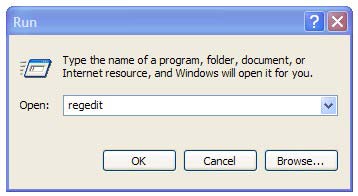
First Click Start Button >  Click Run.
A Run box will appear
In the Run box, type regedit and hit Enter Key.


Then locate the following key in the left side

HKEY_LOCAL_MACHINE\SOFTWARE\Microsoft\Windows\CurrentVersion\Explorer\Shell Folders


Double click on any locations you want to change and after Value Data Box Change the desired folder location.  


Ex: If you Change the My Documents folder location, My Documents is normally list as "Personal"
Double click on “Personal” Value Name and give the desired folder path.  

That's all.

Close the registry Editor, you must restart your computer before the changes that you make affect   


CAUTION! : It is recommends that before you attempt to use the registry editor, make sure that you back up the whole registry or export the registry keys in the registry that you plan to edit. Incorrectly editing the registry may damage your system. Use Registry Editor at your own risk, we cannot guarantee that you can solve problems that result from using Registry Editor incorrectly.


Category: Registry Tweaks
Operating System : Windows

Recommended Articles

100 GB Free Backup

 
Contact Form