How to Find | Windows Product key | Installation Date | OS Version | on a Computer


Download Free Download Windows CD-Key Revealer 1.3 - Recover Your Windows Product key
Simple and small application that instantly help you recover Windows activation key
Windows CD-Key Revealer  Download + Portable Download 

NOTE: You can watch this entire video to "How to know windows product key - installation date & Operating system"
Windows CD-Key Revealer is a very simple and small application that instantly help you recover Windows activation key, which is especially useful in the event of losing its original physical form. 

Windows CD-Key Revealer is one typical message box containing the product key.
The program does not require installation and its operation is child's play. Just run the downloaded file, and the second will receive a message containing our key product. The program supports virtually all versions of Windows, thus being a useful tool for anyone who somehow lost his key. 

Windows CD-Key Revealer is a lightweight software application designed specifically for helping you get information about your operating system and Windows CD key using straightforward actions.

This is a portable utility that can be run on your system by simply opening the executable file (there’s no setup included in the process).

You do not need to appeal to third-party uninstallers for getting rid of it, as the task can be accomplished via a simple deletion process.


In addition, you may store it on portable media devices, such as USB flash drives, carry it with you, and run it on the target system without administrative privileges. No entries are left in your Windows registry and other configuration items in your PC.

Windows CD-Key Revealer doesn’t employ a GUI for helping you grab the desired information about your system. It actually employs a notification panel that embeds the necessary details.

As soon as you open the executable file, the application automatically pops up a minimalistic window that shows information about your operating system, installation date, as well as CD key.

If you click on the ‘OK’ button, the CD key is copied to the clipboard, so you may easily transfer data into other third-party utilities. Tests have shown that Windows CD-Key Revealer carries out a task quickly and without errors. It leaves a minimal footprint on your system resources.

All things considered, Windows CD-Key Revealer delivers a simplistic and efficient software solution for getting the Windows CD key and information about the OS, and can be handled by rookies and professionals alike.

For More Information you can watch the above video to "How to know windows product key - installation date & Operating system"

Platforms: Windows XP,Windows Vista, Windows 7,Windows 8 &  8.1,Windows 10 
Size: 61.2 KB

How to know | Windows Product key | Installation Date | Operating System |  Click the followings links below to Download free CD-Key Revealer

Photobucket

Download Now


If you have any questions, Please feel free to leave a comment below and we’ll try to help you out. If you found this article useful, why not share it with your friends and help inform others.


Search Terms : How, How to, windows 10 product key,windows 10 key,windows 7 product key,windows 8.1 product key,cd keys,windows 7 key,windows product key,windows 10 license key,product key for windows 10,buy windows 10 product key,windows activation key,windows 8 product key,free windows 10 product key,windows 10 home product key,find windows 7 product key,windows key,find windows 10 product key,windows key finder,windows 7 license,find the product,windows 10 activation,windows 8 key,windows 10 cd key,windows 7 activation key,free windows 7 product key,microsoft product key,product key,windows 10 product key finder,how to find windows 10 product key,product key finder,how to find windows 7 product key,windows product key finder,,


Category: Software
Windows CD-Key Revealer

Speccy Portable - Total System Information tool for your PC


Download Free Speccy Portable
Most popular Information tool for your Computer:
Speccy Portable Download + Portable Download 

Speccy is a portable tool that will give you detailed statistics on every piece of hardware in your computer. Including CPU, Motherboard, RAM, Graphics Cards, Hard Disks, Optical Drives, Audio support. Additionally Speccy adds the temperatures of your different components, so you can easily see if there's a problem. If you need to add more memory to your system, for example, you can check how many memory slots your computer has and what memory's already installed. Then you can go out and buy the right type of memory to add on or replace what you've already got. 


Designed by Piriform, Speccy is a small but powerful software that can give you information on your computer's hardware and software.

Since this is a portable product, installation is not necessary. Simply place Speccy Portable on an external device and you are free to run it on any computer. Also, your Windows registry entries will not be affected.

The user interface of the application consists of a clean and intuitive window in which your options revolve around the summary, operating system, CPU, RAM, motherboard, graphics, hard drives, optical drives, audio, peripherals and network (including temperatures).

So, you can find out about the User Account Control, firewall notification level, Windows automatic updates, Windows Defender, antivirus, environment variables, power profile, uptime statistics, timezone, scheduler, process list, hot fixes, system folder, device tree and services.


But you can also check out details about CPU cores, threads, package, technology, specification, hyperthreading, fan speed, average temperature and more, as well as RAM memory slots, physical memory and SPD modules.

In addition, you can view the motherboard's manufacturer, model, chipset vendor, system temperature, BIOS, voltage and PCI, and the graphics monitor, temperature, current performance level, technology, shaders, and others.
Furthermore, you can read S.M.A.R.T. data on your hard drives, information about sounds cards, playback devices, keyboard, mouse, printers, WiFi, current TCP connections, and more.

The program uses a low-to-moderate amount of system resources, includes online documentation and lets you take snapshots, as well as export information to an XML or TXT file.

There's also a search function at your disposal and you can change the interface language, temperature units and automatic update mode.

All in all, Speccy Portable is an excellent tool for providing you with important information on your system and we strongly recommend it to all users.
Platforms:
Windows XP,Windows Vista (32 bit),Windows 7 (32 bit),Windows Vista (64 bit),Windows 7 (64 bit),Windows 8,windows 10Version:1.30.728
Size: 5.21 MB

Features and improvements:
- Improved Windows 10 Anniversary Edition compatibility 
- Updated support for latest Intel Kaby Lake processors 
- Improved 64-bit build architecture 
- Improved localisation support 
- Minor GUI improvements
- Minor bug fixes

 Click the followings links below to Download free Speccy Portable

Photobucket

Download Now


If you have any questions, Please feel free to leave a comment below and we’ll try to help you out. If you found this article useful, why not share it with your friends and help inform others.


Search Terms : How, How to, Speccy Portable, Download, download Speccy Portable, download Piriform Speccy Portable, free download, download free,System tool, Hardware Tool, System Information Software, download Speccy Portable offline installer, download Speccy Portable online installer, free Download Speccy Portable 1.30.730, Download Speccy Portable version,


Category: Software
Speccy

PcBoost v.4.4.2 - Make Your CPU Run Faster


Download Free PcBoost - Make Your CPU Run Faster
PcBoost is a program which allows you to run programs much faster then the original programmer intended. With little to no effort you can easily make programs & games run faster on your computer without having to purchase a new PC. Many programs and games often use a minimal amount of CPU power which often leads to the CPU being idle and really not much use at all. PcBoost takes advantage of this by allocating more CPU power to the currently active program/game. All of this is done automatically without having you to lift one finger. PCBoost's simple to use interface allows you to set it and forget it, and let PCBoost automatically make your applications work faster.


PCBoost is a great affordable alternative to purchasing a new computer and can in no way harm or destroy a computer, while providing equivalent power that a faster processor would. For instance if your computer has two CPU cores and core one is at 75% and core two is at 25%, then PCBoost will make sure the application will run on core two. This feature allows applications to always have the most processing power available and instantly makes your computer run faster.

Main Features:
• Optimizes games and applications by increasing the CPU priority thread of the currently active application
• Automatically de-allocates CPU priority when a new active application is selected
• Works in the background to optimize applications constantly, raises priority levels to reasonable values to maintain system stability and performance
• Visual representation in the Windows system tray which displays the priority optimization for the currently active application
• Built-in and constantly updated block list of applications which are not compatible
• Fully customizable interface which allows end-user to change the look of the software and the Windows system tray icon theme
• Compatible with Microsoft Windows 7, Vista, XP & Windows Server 2008, 2003. 32-BIT/64-BIT ready.

Version: 4.4.2.2012
Size: 4.27 Mb
Requirements: Win XP/2000/Vista/Win 7
Language : English

Click the followings links below to Download PcBoost v.4.4.2  
Photobucket

Download Now


Search Terms : How, How to, How do, Download, PcBoost, Download PcBoost, Free Download PcBoost, crack PcBoost, Serial PcBoost, Patch PcBoost, PcBoost 4 serial key, PcBoost free download, PcBoost review, Pc Boost free, PcBoost serial number, Download PCBoost 4.3.26.2012, PGWARE PcBoost, PCBoost 4.4.2.2012 Download, Download PCBoost free, PcBoost.exe, PcBoost.zip, PcBoost.rar, PC Maintenance, Boost your computer speed,  Pgware Softwares,

Category: Miscellaneous
Software

How to Uninstall Windows Hidden System Softwares


How to Uninstall Windows Hidden System Softwares:

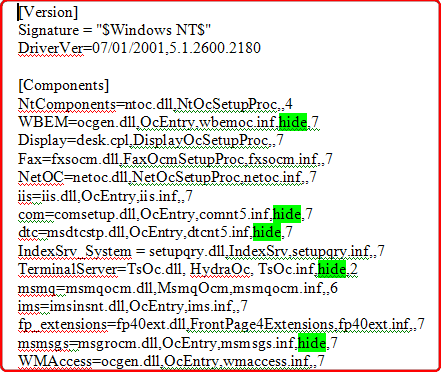
Microsoft Windows XP comes with a set of preinstalled software. Many of them can not find even Add/Remove programs. You might want to uninstall hidden system software, such as Windows Messenger, Pinball, WordPad etc., simply open the “Sysoc.inf” note pad file

So at first you must have Windows XP setup to display system files and hidden files and folders.

How to display system files and hidden files and folders.

Please follow the steps given below:
Open any folder then go to Tools Option


·         Click on Folder Options
·         Click on the View tab
·         Advanced settings
·         Hidden files and folders > Check Show hidden files and folders
·         But uncheck hide extensions for known file types and hide protected operating system files 


Then search “sysoc.inf” text file


Open “sysoc.inf” text file and search for the word “hide” the word “HIDE” appearing several places remove the word “hide” but keep commas: ,hide, = ,,


After you can go to the Add/Remove Programs > Control Panel > select Add/Remove Windows Components then uninstall unwanted windows programs.

That's all.


CAUTION! : These tips and tricks are advanced, we can not guarantee that you will be able to solve your problem that result from using tips and tricks incorrectly and is used at your own risk.


Category: Tips & Tricks
Operating System : Windows

What is Operating System and Types of Operating System


An operating system is a set of programs. It is the interface between user and computer. It crates the user friendly environment. The operating system collets the various recourses ( printer, tape, disks etc.,)  and grant these resources to various process. For an example we want to copy a program in DOS operating system, just we type the command that will copy the program ( C: copy source destination).
Ex: we want to copy a program without operating system, then we have to write a program for copy command, then only we can copy the file. It is very difficult processing, so the main purpose of the operating system is to crate user friendly environment.

HISTORY OF OS OPERATING SYSTEM: 

In early 1980. When the IBM Computer Company was search of the Operating System. Which can take the full advantage of the system. It was released in 1981 on August 11th  , The IBM was named the operating system as P.C.DOS. Then the 86 DOS was Changed into DOS for IBM Corporation by Tim Paterson.


Unix is also a multi user Operating System. It is developed in 1967 at  'C' Language is the middle Level Language developed for developing Unix laborating system at Berkeley Laboratory

Xenix is a modified from 'F' unix workable on all PC's. VAX Operating System is generally meanted for main for mainframe computers.

Z-80 is Zelog unix Operating System.

Types of Operating System: 

The Operating System mainly classified into following types.

1. Single user Operating System.

2. Multi user Operating System.

3. Time Sharing Operating System.
4. ON Line Operating System.
5. Multi Programming Operating System.
6. Multi Process of Operating System.
7. Virtual Operating System.

The Multi Processor and the time sharing Operating System are named by the Concept of instructions. Single User Operating System:
Example:         (a) PC. DOS 
                       (b) MS-DOS

Multi User Operating System:
Example:          Unix, Xenix, VAX


What is Software and Types of Software


The term of software refers to programs which are invisible to the eye and which are essential to be made use by the user to run on the computers either to run the system or to run his job. Software is a set of programs and the program is a set of the instructions. An instruction is any character or word or group of words which instruct the computer in a way that the computer can understand.

Computer Software may be broadly classified into two types.
(a) System Software
(b) Applications Software


System Software:
System Software is used to run the system and control the system. System software mainly consists of operating system and maintenance tools.
Operating system acts as the interface between the applications software and the hardware. it consists of  3 basic modules. Namely (a) I-O Control (b) File Control (c) Process Control
The operating  system is a set of programs that are used to make the resources of the computers to be available  to the user of the application software. The maintenance tools include antivirus tool kit and some utility software to make the system run in good condition. Anti Virus tool kit is software to fight the virus and protect the stem from bugs and troubles. These bugs and troubles are created by the virus, the software to disturb the maintenance and running of the computer and software in good condition.

Application Software:
Application software is that which is used by the user for writing his own applications. It is sub-divide into 3 categories
a) Application Programs
b) Programming Languages
c) Utilities

a) Application Programs
An Application program is a software designed for a specific type of applications like documentation, graphics etc.,

b) Programming Languages
programming language is a language which is used to write some programs to do a specific job. It  is universal in nature.

c) Utilities
Utilities are one type of software which give support for the user in using other type of Application Software.


Recommended Articles

100 GB Free Backup

 
Contact Form